 Dept SIM
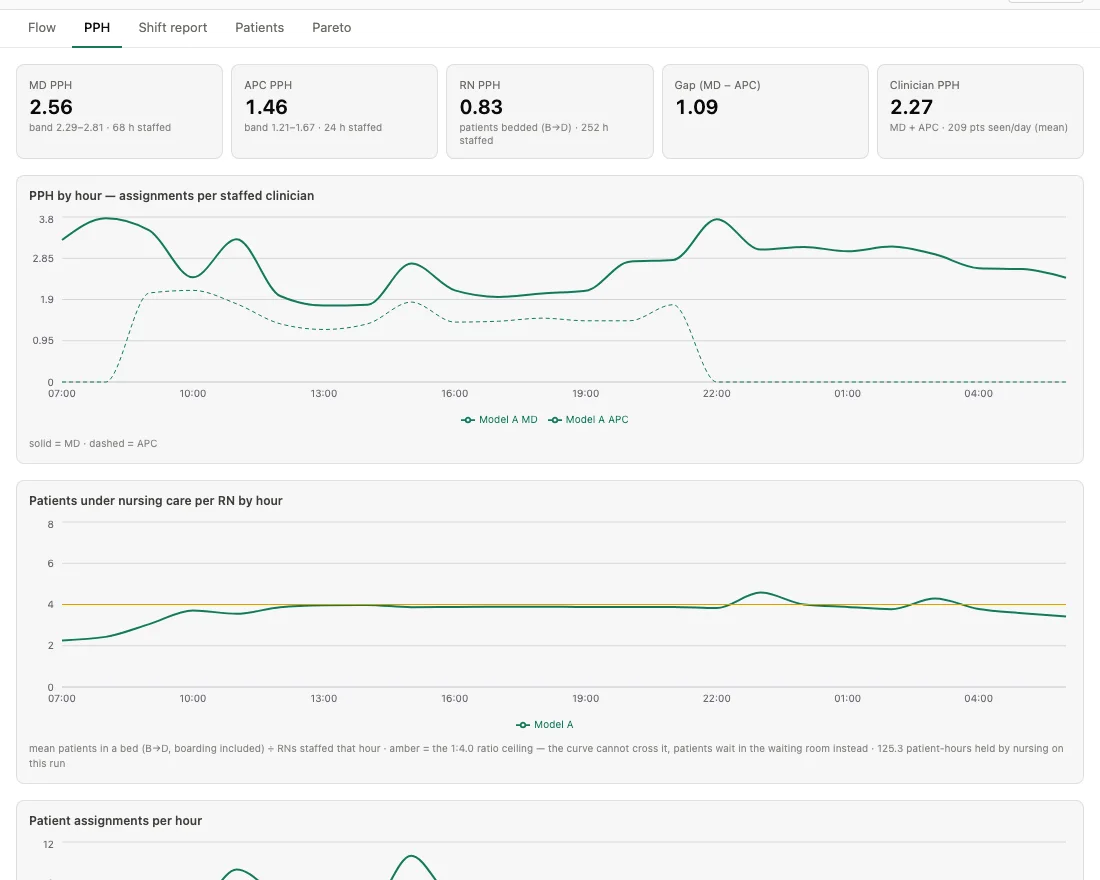
PPH
Patients per hour by clinician type, with p10–p90 bands across replications — and a breakdown of why eligible patients bypassed the APC anyway: station closed, cap hit, or already at capacity.
Dept SIM is a discrete-event simulator of an emergency department. Build a day — arrivals, acuity, staffing, available beds — and watch it play out patient by patient. Then change one thing and read what actually changed.
Free to run · Try the demo without an account · Log in for your dashboard, saved simulations and your own variables · Everything runs in your browser
Any department is a queueing system wearing a stethoscope. Dept SIM takes that literally, to deconstruct the micro and macro steps in the patient and clinician journeys.
The day's arrivals are drawn from a fitted hourly curve — volume, acuity mix, EMS fraction, morning- or evening-heavy tilt. You don't start from an empty department: the simulation opens on a 07:00 census of patients already in the building, placed where the data says they'd be.
You decide — forty rooms, twelve recliners, six hallway stretchers, a waiting room and a fast track with opening hours. Bed placement is zone-aware: ambulatory patients take recliners, stretcher-bound patients take main rooms and hallway spaces. Imaging is a queue of its own — ordered, transported and performed.
Physicians are assigned patients, and APCs are accounted for on appropriate patients — they sit behind an eligibility filter, a soft hourly cap, and a station that has to be open to be useful. That asymmetry is the reason this tool exists, and it is visible in every output.
A ratio ladder gates bedding. When nurses are short the department cannot absorb its own waiting room, patients hold in the lobby instead of a bed, and the walkout hazard goes to work on them. Nursing is a constraint here, not a column in a report.
Patients per hour by clinician type with p10–p90 bands, walkouts, boarding at handoff, longest wait to be seen, length of stay, and the full roster of simulated patients — per hour, per shift, and per replication.
Step 1 — Establish the assumptions. Step 2 — See the simulation. Step 3 — Adjust and run the simulation again.
The day you're asking about. Daily volume and acuity mix, arrival pattern, EMS share, the shifts your physicians, APCs and nurses actually work, which stations are open and when, and the census you inherit at 07:00.
That day, played out. A schematic of the floor with patients moving through it on a scrubbable clock, a shift report for days and nights, per-hour curves, and the roster of every patient the day produced.
The change you're testing. Move the APC from fast track to the main ED, raise or drop the hourly cap, widen eligibility, close a station for four hours, inject a surge — and watch the delta appear against the baseline.

Multiple views of a simulated day.
Patients per hour by clinician type, with p10–p90 bands across replications — and a breakdown of why eligible patients bypassed the APC anyway: station closed, cap hit, or already at capacity.
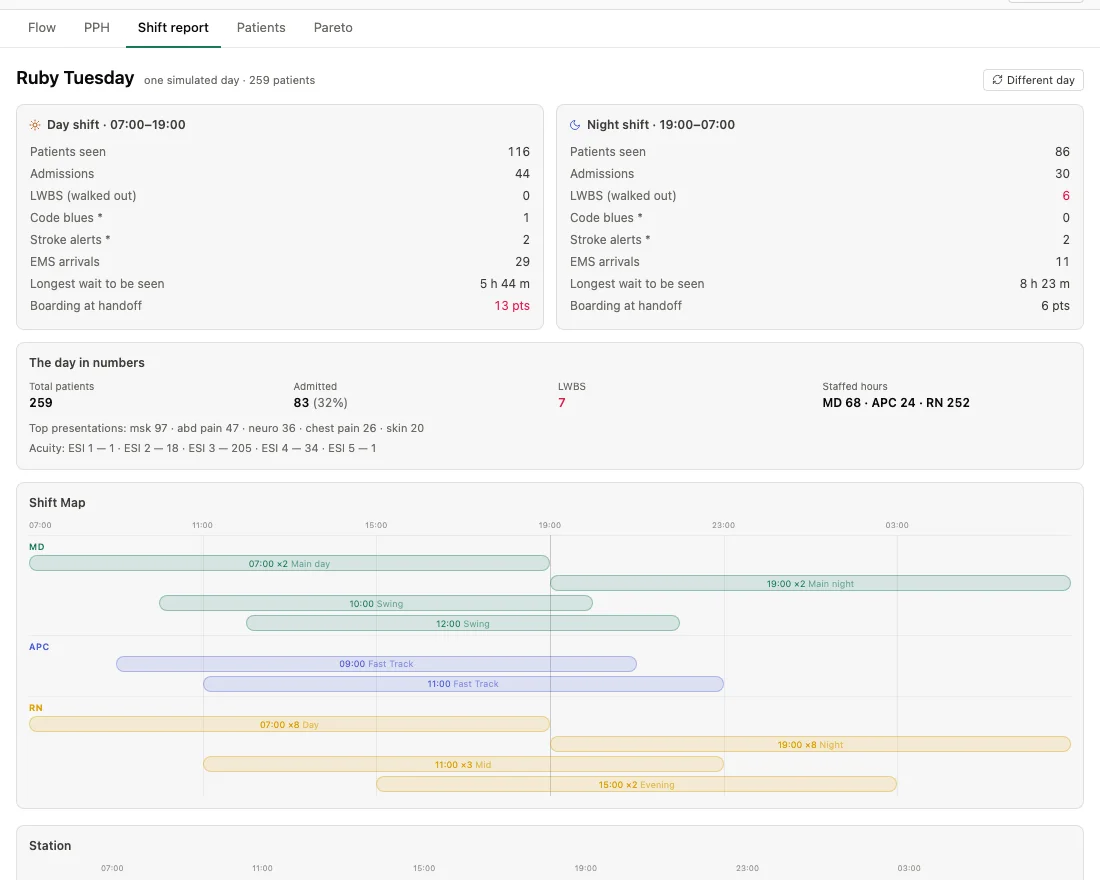
Day and night side by side: seen, admitted, walked out, longest wait to be seen, boarding at handoff — with the shift map and station hours that produced them.
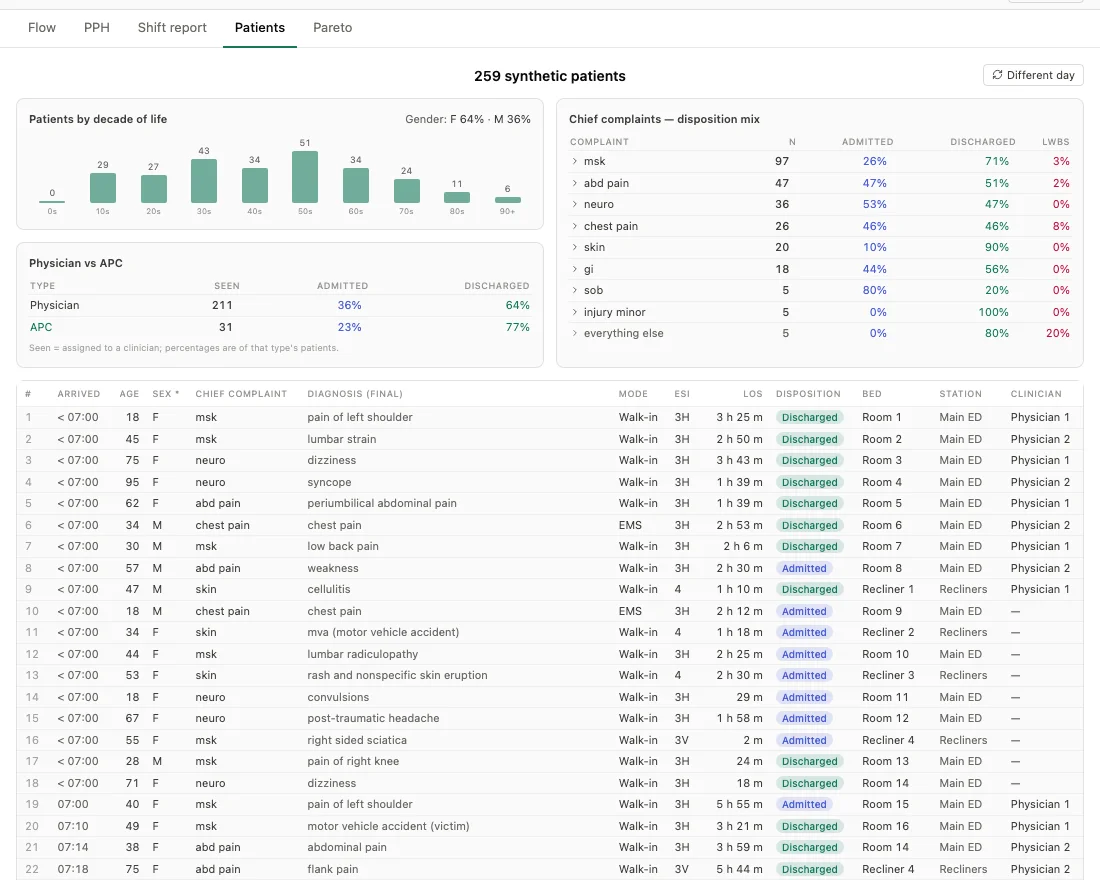
Every simulated patient, individually: age, acuity, complaint, final diagnosis, bed, station, clinician, disposition and length of stay. Synthetic people, fitted behaviour.
The starting point is defined. The result is created based on this using discrete-event simulation across 200 seeded replications.
Worth being blunt about, before you quote a number from it.
Every figure is the output of a Monte Carlo simulation built from configurable assumptions. They are estimates, not observations, and they move when the assumptions move.
The staffing, layout, capacity and policy in the public baseline are inventions. They do not represent any specific department, and the tool makes no claim about one.
The roster is generated from a synthetic patient bank. Nothing on your screen describes a real person, and the simulation runs on your device — it never sends a scenario anywhere.
Dept SIM is for exploration and education. It is not medical, legal or operational advice, and it should not be the sole basis for a staffing or clinical decision.
Run it signed out for as long as you like. Sign in only when you want to keep something.
The engine, the levers, every preset and the PDF export all work signed out. An account changes nothing about what the simulator can do.
Sign in with a magic link or with Google and your saved SIMs sync to your account, so a scenario you built on one machine opens on the next.